Connectivity for High Availability
A Namespace with High Availability features spans two regions, and the endpoint your Workers and Clients connect through determines how they behave before, during, and after a failover. This page covers:
- How to choose between the Namespace Endpoint and a Regional Endpoint for a Namespace with High Availability features.
- How to configure PrivateLink so that failover remains transparent to Workers on private networks.
How to choose an endpoint for a Namespace with High Availability features
Temporal Cloud exposes two kinds of gRPC endpoints for a Namespace. See How to access a Namespace for the general definitions; this section focuses on how each behaves with replication and failover.
Namespace Endpoint (recommended)
Format: <namespace>.<account>.tmprl.cloud:7233
The Namespace Endpoint always connects to whichever region is currently active. Under the hood, it is a CNAME that points at the active region's Regional Endpoint. When Temporal Cloud fails the Namespace over, it updates the CNAME to point at the new active region. The DNS TTL is 15 seconds, so Clients converge within about 30 seconds with no configuration change on your side.
Use the Namespace Endpoint unless you have a specific reason to pin traffic to a region.
Regional Endpoint
Format: <cloud>-<region>.region.tmprl.cloud:7233 (for example, aws-us-west-2.region.tmprl.cloud or gcp-us-central1.region.tmprl.cloud).
See regions for the full list.
A Regional Endpoint is shared across every Namespace that is active or replicated in that region. Unlike the Namespace Endpoint, a Regional Endpoint stays pinned to the region in its name — if that region holds the passive replica of your Namespace, the Regional Endpoint connects to the passive replica.
Use a Regional Endpoint only when you need explicit control over which replica a Client or Worker reaches.
Trade-offs to consider:
- Faster recovery. A Worker connecting through a Regional Endpoint skips the DNS step that Clients on the Namespace Endpoint wait for during a failover. This removes the ~30-second DNS convergence window from the recovery path, which is useful for Workloads that must minimize Recovery Time at all costs.
- You are responsible for regional coverage. A Worker using the Regional Endpoint of a region cannot reach the Namespace if that region is in an outage. To stay available through a failover, you must run Workers that use the replica region's Regional Endpoint — Workers pointed only at the outage region's Regional Endpoint will not reconnect automatically.
When authenticating with mTLS, set the Client's server_name / serverNameOverride config equal to the Namespace Endpoint.
This overrides the SNI that the Client will expect during the TLS Handshake with Temporal Cloud.
The Regional Endpoint forwards the request to your Namespace, so the Client must expect the Namespace's certificate during the TLS handshake.
For example, in Typescript, the Client's config would be set like this:
await Connection.connect({
  address: 'aws-us-east-1.region.tmprl.cloud:7233',
  tls: {
    serverNameOverride: 'my-namespace.my-account.tmprl.cloud',
    clientCertPair: { crt: clientCert, key: clientKey },
  },
  ...
});
How endpoints route on failover
Consider a Namespace replicated across us-east-1 (initially active) and us-west-2 (initially the replica), with a failover that swaps the two.
| Client connects via | Before failover | After failover |
|---|---|---|
| Namespace Endpoint | us-east-1 | us-west-2 (automatic) |
Regional Endpoint aws-us-east-1.region... | us-east-1 | us-east-1 |
Regional Endpoint aws-us-west-2.region... | us-west-2 | us-west-2 |
The Namespace Endpoint moves with the active region via an updated CNAME — no Client changes required. The Regional Endpoints do not change their targets on failover: each continues to route to the replica that lives in its region.
How to use PrivateLink with High Availability features
Proper networking configuration is required for failover to be transparent to Clients and Workers when using PrivateLink. This section describes how to configure routing for Namespaces with High Availability features on AWS PrivateLink.
These instructions assume you already have the private connections in place. If not, follow the AWS PrivateLink or GCP Private Service Connect creation guides first.
How HA + private connectivity works
A Namespace with High Availability features has two replicas — a primary and a secondary, in different regions or different cloud providers. At any moment, one is active and one is passive. On failover, Temporal Cloud changes the active replica.
Temporal Cloud expresses the active replica through DNS:
- The Namespace DNS record (
<ns>.<account>.tmprl.cloud) is a CNAME. - It points to the active region's regional record (
<provider>-<region>.region.tmprl.cloud). - On failover, Temporal Cloud rewrites the CNAME target.
Namespace DNS records have a 15-second TTL. Clients should converge to the new region within roughly 30 seconds (about twice the TTL) once their resolver cache expires.
For private connectivity, your job is to make sure that:
- Override the Regional Endpoint's DNS zone to resolve to a VPC Endpoint.
- Ensure network connectivity between the two regions.
Single-cloud HA on AWS PrivateLink
How Namespace DNS records work with PrivateLink
When using PrivateLink, you connect to Temporal Cloud through a VPC Endpoint, which uses addresses local to your network.
Temporal treats each region.<tmprl_domain> as a separate zone.
This setup allows you to override the default zone, ensuring that traffic is routed internally for the regions you're using.
A Namespace's active region is reflected in the target of the Namespace Endpoint's CNAME record. For example, if the active region of a Namespace is AWS us-east-1, the DNS configuration would look like this:
| ha-namespace.account-id.tmprl.cloud | CNAME | aws-us-east-1.region.tmprl.cloud |
|---|
After a failover, the CNAME record is updated to point to the failover region, for example:
| ha-namespace.account-id.tmprl.cloud | CNAME | aws-us-west-2.region.tmprl.cloud |
|---|
The Temporal domain did not change, but the CNAME updated from us-east-1 to us-west-2.
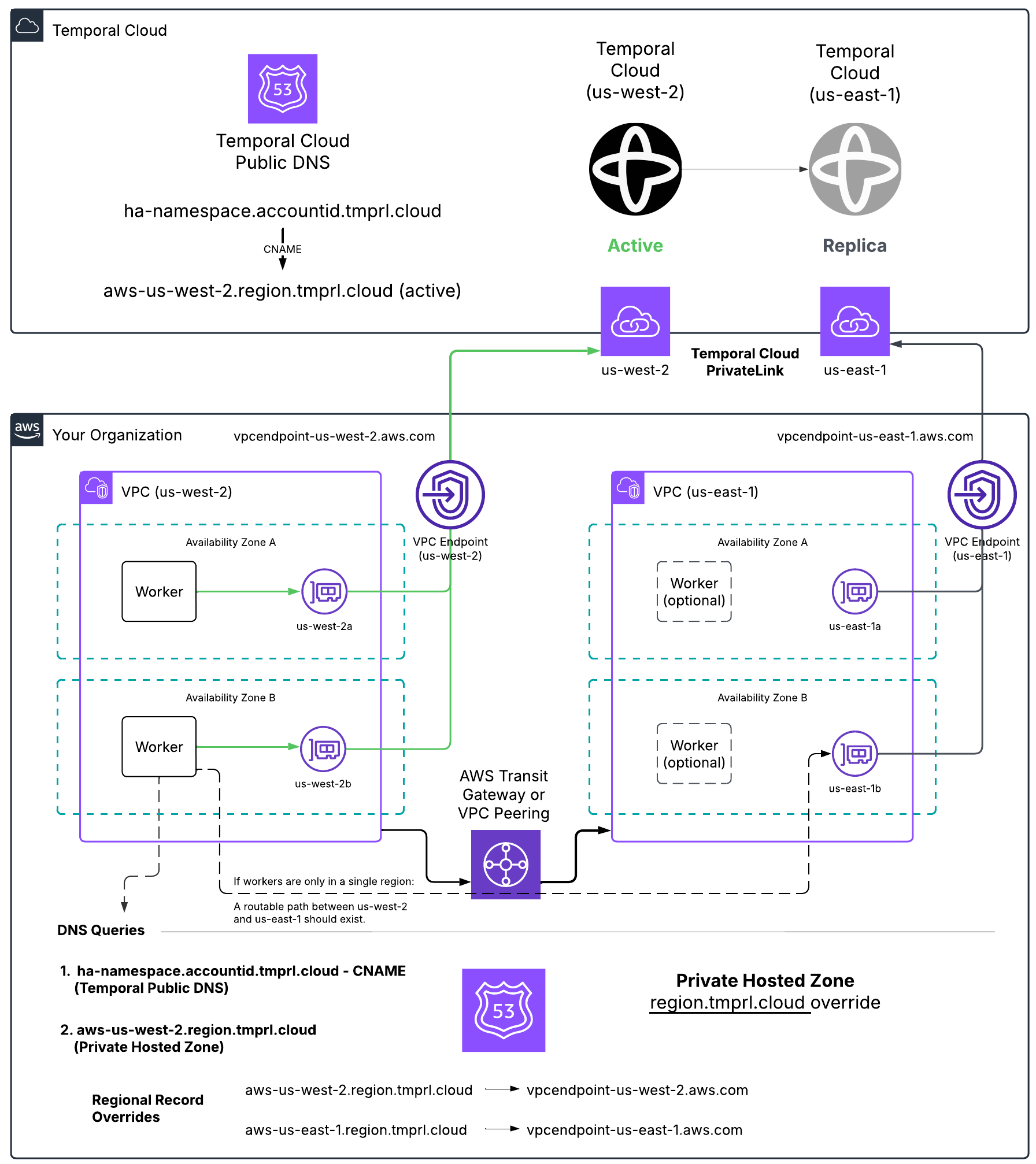
Customer side solution example
How to set up the DNS override
In AWS, use a Route 53 private hosted zone for region.tmprl.cloud to override resolution per region:
| Record name | Record type | Value (your VPC Endpoint DNS) |
|---|---|---|
aws-us-west-2.region.tmprl.cloud | CNAME | vpce-...-us-west-2.vpce.amazonaws.com |
aws-us-east-1.region.tmprl.cloud | CNAME | vpce-...-us-east-1.vpce.amazonaws.com |
Link the private zone to every VPC where Workers run.
When your Workers connect to the Namespace, they first resolve <ns>.<account>.tmprl.cloud, which CNAMEs to <aws-active-region>.region.tmprl.cloud, which then resolves to your local VPC Endpoint.
You also need to decide how Workers reach whichever region becomes active. Either:
- Run Workers in both regions continuously (recommended), or
- Establish cross-region connectivity (Transit Gateway, VPC Peering) so Workers in one region can reach the VPC Endpoint in the other.
Single-cloud HA on GCP Private Service Connect
For GCP-only HA, the same model applies, but use a Cloud DNS private zone for region.tmprl.cloud and point each gcp-<region>.region.tmprl.cloud record at the local PSC endpoint IP address.
| Record name | Record type | Value (your PSC endpoint IP) |
|---|---|---|
gcp-us-central1.region.tmprl.cloud | A | 10.x.x.x (PSC endpoint IP) |
gcp-us-east1.region.tmprl.cloud | A | 10.x.x.x (PSC endpoint IP) |
A Connectivity Rule is required for each PSC connection — see GCP PSC setup and Connectivity Rules.
Multi-cloud HA (AWS PrivateLink + GCP Private Service Connect)
If your replicas span clouds — for example, AWS us-east-1 (active) and GCP us-east4 (passive) — your Workers need a way to reach the active replica regardless of which cloud it's in. The Temporal-managed CNAME rewrites still work the same way; the harder problems are on the client side.
Plan for these three things:
- DNS overrides for both clouds. Your private DNS for
region.tmprl.cloudneeds entries for both the AWS region (CNAME → AWS VPCE) and the GCP region (A → PSC IP). This typically means a Route 53 private hosted zone in your AWS Worker VPCs and a Cloud DNS private zone in your GCP Worker network — both for the sameregion.tmprl.cloudparent — each with the records relevant to the cloud the Workers run in. - Worker reachability across clouds. Your AWS-resident Workers must be able to reach the GCP PSC endpoint when GCP is active, and vice versa. Options include:
- Run Workers in both clouds (preferred — simplest, lowest latency, matches the failover model).
- Establish cross-cloud connectivity (e.g., AWS Transit Gateway + GCP Cloud Interconnect, or a third-party transit) so Workers in one cloud can resolve and reach the other cloud's private endpoint.
- Connectivity Rules in both regions. GCP PSC requires a Connectivity Rule. AWS PrivateLink does not, but if you want to enforce private-only access, add one for the AWS side as well so the Namespace is private-only in both regions.
GCP Private Service Connect endpoints return only A (IPv4) records — there is no AAAA (IPv6) record. Most Linux distributions handle a missing AAAA gracefully, but Alpine Linux's musl resolver returns a SERVFAIL when AAAA is missing, which can cause Temporal SDK clients to fail name resolution after a failover from AWS to GCP.
If you run Workers on Alpine and use multi-cloud HA, either:
- Switch the Worker base image to a glibc-based distribution (Debian, Ubuntu, distroless), or
- Configure your application/runtime to disable AAAA lookups (e.g., set
GODEBUG=netdns=go+v4for Go, or prefer IPv4 in the Java/Node/Python runtimes you use).
To set up the DNS override, configure specific regions to target the internal VPC Endpoint IP addresses.
For example, you might set aws-us-west-1.region.tmprl.cloud to target 192.168.1.2.
In AWS, this can be done using a Route 53 private hosted zone for region.tmprl.cloud.
Link that private zone to the VPCs you use for Workers.
A reasonable validation plan:
Consider how you'll configure Workers for this setup. You can either have Workers run in both regions continuously or establish connectivity between regions using Transit Gateway or VPC Peering. Either approach ensures Workers can access the newly activated region once failover occurs.
Available regions, PrivateLink endpoints, and DNS record overrides
The sa-east-1 region is not yet available for use with Multi-region Namespaces. Currently, it is the only region on the continent.
The following tables list the available Temporal regions and the DNS record overrides used for HA + private connectivity:
AWS regions and PrivateLink endpoints
GCP regions and Private Service Connect endpoints
When using a Namespace with High Availability features, the Namespace's DNS record <ns>.<account>.tmprl.cloud points to a regional DNS record in the format <provider>-<region>.region.tmprl.cloud, where <provider>-<region> is the currently active region for your Namespace.
During failover, Temporal Cloud changes the target of the Namespace DNS record from one region to another. Namespace DNS records are configured with a 15-second TTL. Any DNS cache should re-resolve the record within this time. As a rule of thumb, receiving an updated DNS record takes about twice (2x) the TTL — clients should converge to the newly targeted region within, at most, a 30-second delay, assuming their resolver and language runtime honor the TTL.